A beautiful Astro website is a great starting point. The next question usually arrives when someone needs to publish an article, change a service description or upload new project photos: who is going to manage the content?
EmDash offers an appealing answer. It brings a content management system into the Astro application itself, with an editing interface for the people publishing and a TypeScript workflow for the people building. For teams that enjoy Astro but want more than files in a repository, that is a combination worth exploring.
We looked at the project, its current documentation and the practical differences from Sanity and WordPress. Here is what makes EmDash interesting—and where the choice still depends on your website.
What is EmDash?
EmDash is an open-source, full-stack TypeScript CMS built on Astro. You get a place to manage content alongside the framework that renders your public website.
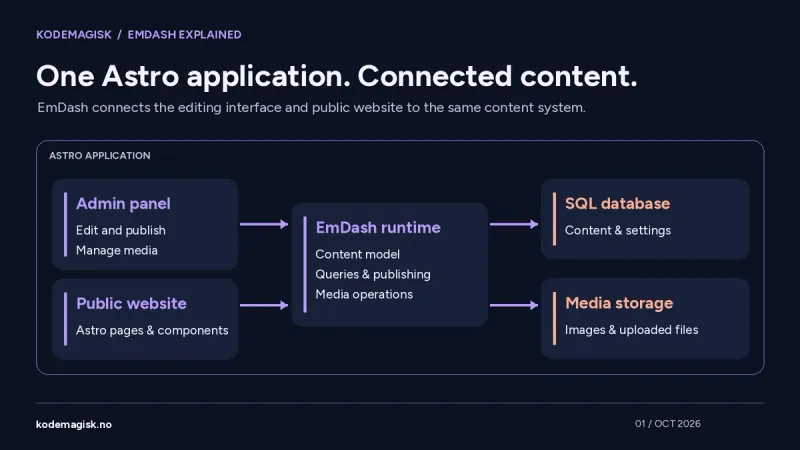
The architectural idea is straightforward: the administration interface and the public pages belong to one deployed application. They share a content model, a database and media storage through the EmDash runtime. Astro components decide how the content looks; EmDash provides the tools for managing it.
For a business website, this could mean an editor updates a service page in the dashboard while the developer keeps control of typography, layout and reusable components. The editor does not need to change a source file to correct a paragraph.
This is especially attractive when the website itself is the centre of the project. You are building a focused publishing system around an Astro site, with the content tools close to the application.
The repository: 13,496 stars, with context
At our check on 8 October 2026, the emdash-cms/emdash repository had 13,496 GitHub stars and 1,284 forks. It uses the MIT licence. The maintainers describe the core as stable and production-ready, while some first-party plugins and tooling still use 0.x versions.
Those stars show that the project has attracted attention. They are not a count of live websites, paying customers or successful migrations. For a real project, the more useful questions are whether the features you need exist, whether your hosting environment is supported and whether the update process is manageable.
The repository is useful beyond its popularity. Having the implementation, templates and development history available makes it possible to inspect how a feature works and follow changes before upgrading. That transparency matters when a CMS becomes part of a business's everyday publishing workflow.
How easy is it to get started with Astro?
For a new project, the shortest route is the interactive scaffolder:
npm create emdash@latest
The introductory workflow requires Node.js 22.16 or later. You can start locally with Node.js, SQLite and local media storage, without first creating a cloud account. After scaffolding and starting the development server, the admin setup is available at /_emdash/admin/.
The setup wizard walks through the site details and administrator account. In the Starter tutorial, sample content lets you edit and publish an existing post, then see the result on the public site. That is a useful first milestone: proving the complete editing-to-publishing path before changing the design.
Starting from a template also gives you something more practical than an empty dashboard. You can work on a real page, replace the sample copy and build up your content structure around the needs of your brand.
Already have an Astro website? You can add EmDash
The existing-project guide supports Astro 6 or later and Node.js 22.16 or later. Its local example adds EmDash, React for the admin interface, the Node adapter, SQLite and media storage.
The main integration points are the Astro configuration and the live content configuration. Public pages can then query content through functions such as getEmDashCollection() and getEmDashEntry(). The developer connects those results to the site's own components.
There is one meaningful deployment change: EmDash needs a server runtime for its administration interface, APIs and current content. The documented setup uses Astro's server output. A purely static deployment therefore needs an appropriate server adapter and hosting arrangement.
This makes the integration approachable for someone already comfortable with Astro. It does not mean that every existing theme becomes a complete CMS website after installing one package. Its hard-coded text, image fields, navigation and page layouts still need to be connected to the content model.
A template you can make your own
An EmDash theme is an Astro project. After creating the site, you edit its routes, layouts, components and styles directly. That is familiar territory for an Astro developer and gives a brand room to grow beyond a template's original appearance.
For example, the documented Node blog template can be created with:
npm create astro@latest -- --template @emdash-cms/template-blog
A sensible first customisation pass changes the logo, colour palette, type scale, navigation and core page copy. The second pass connects the parts that editors need to maintain: article introductions, service details, case studies and calls to action.
The important distinction is between design and content. Let the components protect the visual consistency of the site, while the CMS exposes the information the team genuinely needs to update. Giving someone a clear set of fields is often more useful than making every pixel editable.
What does the editor actually get?
The admin panel includes areas for collections, media and content types, with additional tools depending on configuration and installed plugins. Teams can organise entries, manage uploaded files and work with taxonomies and credited authors.
Menus and widget areas can also be managed through the CMS, but the public Astro components must render them. A field appearing in the dashboard does not automatically create a new section on the website.
For a small team, that division can be a strength. An editor can publish within an agreed structure while the developer maintains a coherent frontend. A photography studio, for instance, might have separate collections for projects, guides and service packages, each with fields suited to that content.
SEO: useful features already in the CMS
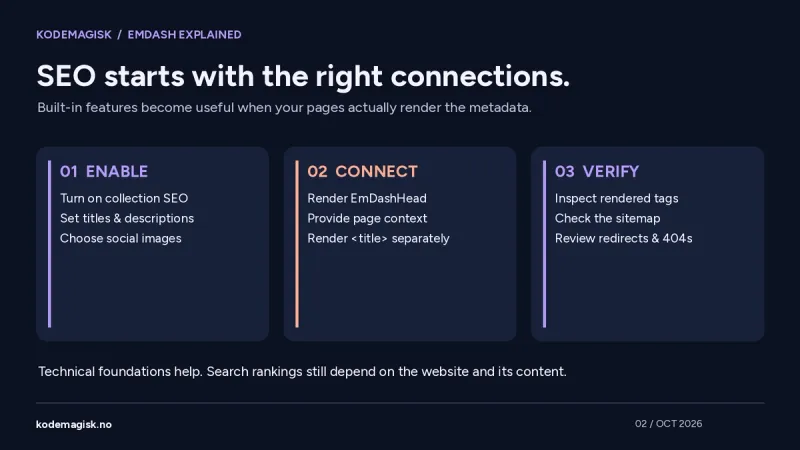
EmDash includes an SEO panel for entry-level titles, descriptions, social images, canonical URLs and indexation controls. It also provides sitemaps, robots.txt, redirects and a 404 log.
These features need the right integration. SEO must be enabled on the relevant collection, and the page must render EmDashHead with the appropriate page context. The HTML title is rendered separately; EmDashHead does not create that element for you.
With the necessary context, the system can output BlogPosting or WebSite structured data. Translated content can receive hreflang links when Astro internationalisation is configured.
That is a useful technical foundation. Search visibility still depends on useful pages, clear information, crawlable links and a well-built website. Choosing a CMS does not guarantee a ranking, and a GitHub star count says nothing about your search traffic.
EmDash or Sanity: where should your content live?
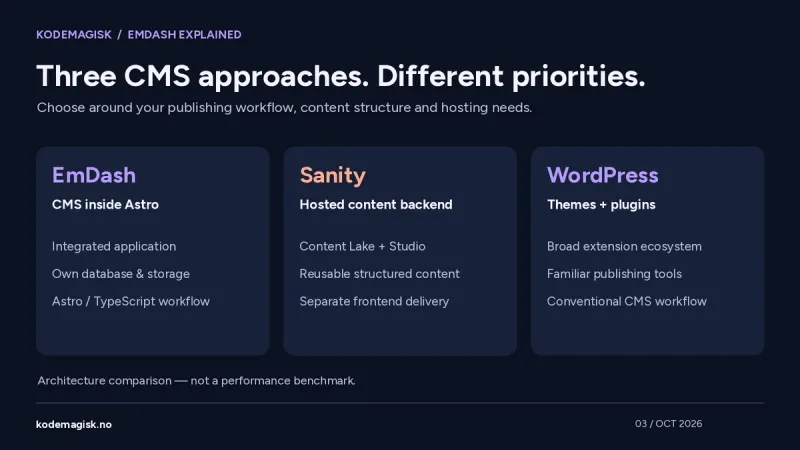
Sanity also has an official Astro integration. Its Content Lake is a hosted content backend, while Sanity Studio is the configurable editing application. The Studio can be embedded in an Astro route, but that does not make the underlying content database part of the Astro deployment.
This separation is valuable when content needs to serve several websites, an app or other channels. Developers query the dataset and choose how each frontend presents the information. Sanity's Astro tooling supports static and server-rendered approaches, with visual editing available through the appropriate setup.
EmDash takes a closer-to-the-site approach: the CMS runtime is integrated into the Astro application. In our view, this is a compelling fit when you want a self-hosted CMS centred on one website and are happy to operate its database and storage.
Sanity is worth considering when a shared content platform is the bigger requirement. EmDash is worth considering when ownership of the complete application stack is the bigger requirement. Both can support a polished Astro website; the difference is how the system is organised and maintained.
EmDash or WordPress: the ecosystem matters
WordPress has a broad ecosystem of themes, plugins and publishing tools. For a business that needs familiar editing, readily available extensions and a conventional hosting setup, that remains a practical advantage. WordPress can also expose content through its REST API.
EmDash will feel more natural to a team that already wants Astro components and TypeScript at the centre of its development workflow. The trade-off is that you should check the available EmDash integrations against your actual requirements, especially when a project depends on specialised plugins.
Moving existing content is a separate question from reproducing an entire site. EmDash documents WordPress import routes, including WXR exports and API-based imports. That does not make WordPress themes or PHP plugins directly compatible. Layouts and custom functionality may need to be rebuilt or ported.
If an existing site already does its job well, a migration should solve a real problem: publishing friction, maintenance constraints or a frontend that no longer fits the brand. A newer stack alone is not a business outcome.
Which one would we choose?
| Project priority | A good starting point | What to check |
|---|---|---|
| An Astro site with its own integrated CMS | EmDash | Hosting, persistent storage and required integrations |
| Shared structured content across several frontends | Sanity | Content model, publishing workflow and plan requirements |
| A familiar CMS with a broad extension ecosystem | WordPress | Theme quality, plugin compatibility and maintenance |
These are starting points, not hard limits. The right choice comes from the content, the people publishing it and the services the site must connect to.
Also compare the full cost of ownership. Open-source software can remove a licence fee without removing hosting, backups, upgrades or development work. A managed service moves some responsibilities to a provider, but its plan and usage conditions still need to fit the project. Neither approach is automatically cheaper for every business.
Why EmDash has our attention at Kodemagisk
Astro is one of the technologies we enjoy working with most. It gives us a strong basis for custom websites, while a well-chosen CMS makes those websites easier for clients to maintain after launch.
EmDash is interesting because it brings those two parts together in a way that feels natural to an Astro project. Its open repository, editable templates and built-in publishing tools make it a serious option to evaluate alongside the systems a team already knows.
At Kodemagisk, we work with Astro, Sanity and EmDash to shape the solution around the business: what needs to be published, who will update it and how the website should support enquiries and growth.
Thinking about a new website or an Astro redesign? Tell us what your team needs to manage. We can help you choose the CMS, adapt the design to your brand and build a publishing workflow that is easy to use.