Have a website, but customers cannot find you? 4 things to check in 2026
You invested in a website. You chose the colours, added photos, described your services and published the site. Everything looks good. But weeks go by, and your contact form stays quiet.
Before concluding that “websites no longer work”, it is worth finding out where the journey from a search to an enquiry breaks down. Do people see your pages? Do they visit them? Can they find the information they need? Do they have a clear reason to contact you?
Four things deserve your attention: Google Search Console, tracking visits and enquiries, up-to-date information and useful content. Together, they help you understand what is happening on your website and where you can make improvements.
1. Google Search Console: find out whether and how people find you
Google Search Console is a free tool for monitoring your website’s presence on Google. You can see which searches your pages appear for, how often they are displayed, how many clicks they receive and whether there are indexing problems.
A website can be discovered and indexed without a Search Console account. The benefit of the tool is that it gives you information you would otherwise have to guess: what Google sees and which pages need attention.
Indexing is the starting point
Indexing means that Google has included a page in its index, from which it can select search results. Being indexed does not automatically mean your page will appear among the top results for your services.
In Search Console, you can submit your sitemap: the list of pages you want the search engine to know about. For a new or updated page, you can inspect the URL and, when the option is available, request indexing.
A request does not guarantee indexing or a specific timeframe. If a page is not indexed, it is worth checking why: it might be inaccessible, contain a noindex directive or need other improvements.
Questions worth asking of your data
For a cleaning company in Bærum, a useful question would be: “Do people find us only when they type our company name, or also when they search for our services?”
If you see impressions for a relevant query but few clicks, you can review the page title and how well the page answers the search intent. If an important service page does not appear in the data, first check its status and the period you are analysing.
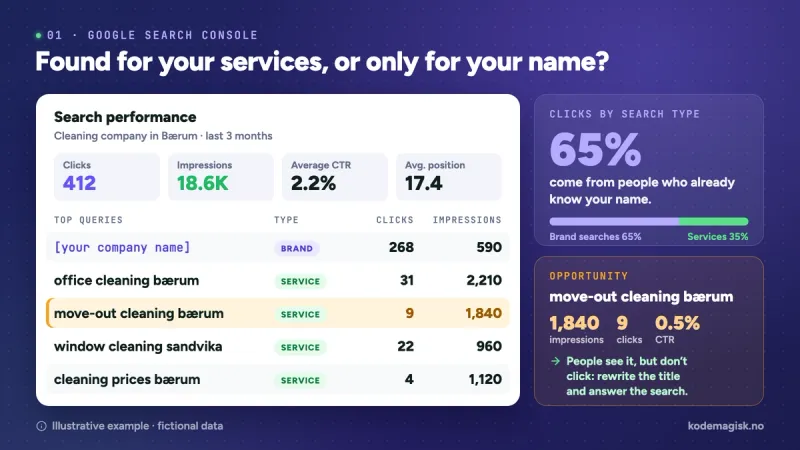
These observations help you choose your next improvement. Without them, you risk rewriting pages that already work while overlooking the service that needs more visibility.
New in 2026: visibility in AI search results
On 3 June 2026, Google announced dedicated reports on visibility within its AI-powered search features. A subsequent update states that these reports became available worldwide from 31 August 2026.
The Search report shows impressions in AI Overviews and AI Mode, with details such as pages, countries, devices and changes over time. If your website does not have enough impressions in these features, the report may not appear.
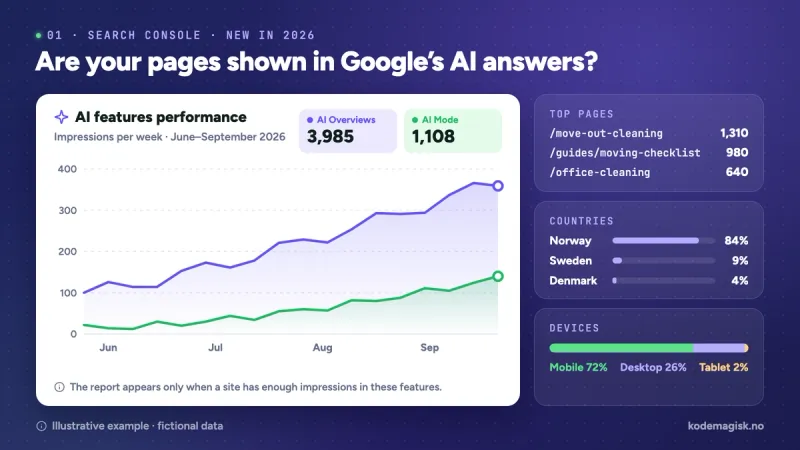
For business owners, this raises a new question: “Which pages on my website are shown to people in Google’s AI-powered experiences?” The report covers Google’s features, rather than every artificial intelligence platform.
2. Google Analytics: track what happens after a visit
Search Console shows your presence in Google searches. Google Analytics 4 helps you understand what people do after they arrive on your website: which pages they visit, which channels they come from and which actions they take.
For a business, visitor numbers become more useful when you connect them to an outcome. One page might attract plenty of traffic without generating enquiries. Another might receive fewer visits but bring in people interested in a specific service.
The important question is: what do visitors who could become customers actually do?
Why we use Google Tag Manager
Google Tag Manager lets you manage measurement tags and events in one place. You can use it to install Google Analytics and track relevant interactions.
It is a practical option, although Analytics can also be implemented directly through the Google tag. The choice depends on your website and what you want to measure.
Simply installing these tools does not automatically bring in visitors. The data becomes useful when you use it to understand your pages and improve the customer experience.
Measure the actions that matter
For a service business website, you can track:
- Successful submission of a quote request form.
- A confirmed booking.
- Clicks on your phone number.
- Visits to an important page, such as your portfolio or service packages.
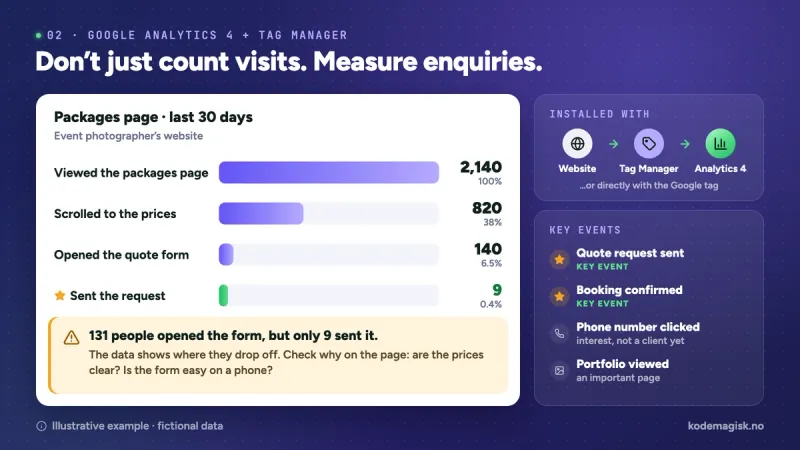
In GA4, actions that matter to your business can be marked as “key events”. A successfully submitted enquiry is a good example. A click on a phone number indicates interest, but does not confirm that a call took place or that you gained a customer.
Imagine, as a hypothetical example, that a photographer gets plenty of visits to the packages page but almost no enquiries. Perhaps the prices are unclear, the form is difficult to use on a phone or the customer does not understand what is included. The data points to the area worth investigating; the reason needs to be checked on the page and in the user experience.
Measurement should be configured and tested against real website actions, while respecting visitors’ consent choices.
3. Up-to-date information: show your business as it is today
A website can look polished and still create confusion. An old price, an incorrect address or a service you no longer offer can complicate a conversation with a potential customer.
Try reading the page as though you were discovering the business for the first time. Is it clear what you can buy, where the service is available and what to do next?
Check regularly:
- Prices, packages and what each offer includes.
- Opening hours, phone number and address.
- The areas you cover and the services available.
- Your portfolio, photos and recent examples.
- Forms, booking buttons and confirmation messages.
- Event dates and availability, wherever these change.
For a cleaning company, a useful update might explain the difference between regular cleaning and end-of-tenancy cleaning. For a photographer, it could clarify how many images are delivered and how long delivery takes.
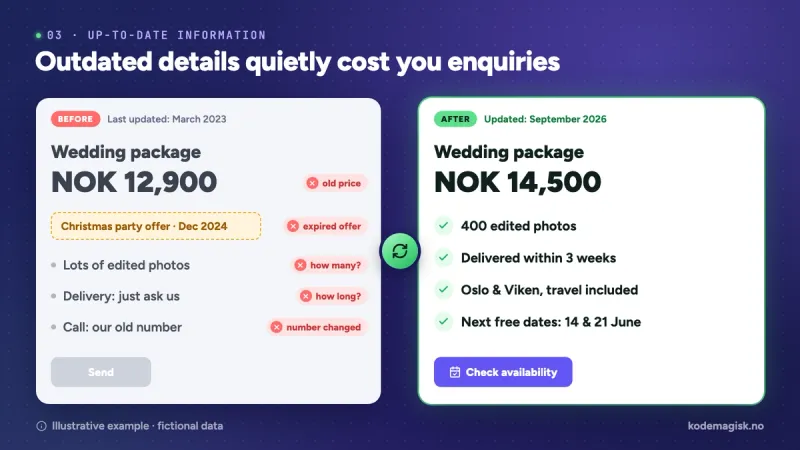
Update your information when your business changes. There is no need to rewrite accurate text every day just to create an impression of activity.
Google also cautions against changing an article’s date without substantially updating its content. The value of an update comes from better information: a clearer answer, a new example or an offer that reflects reality.
An easy-to-manage CMS makes this process simpler. The person responsible for content should be able to manage prices, text and images without turning every correction into a separate project.
4. Blogs and guides: answer questions people ask before buying
A customer does not always start by searching for a supplier’s name. Sometimes they want to understand what a service costs, how to choose or what they need to prepare.
This is where a well-written guide can connect a question to your service. Instead of waiting for someone to know exactly what they need, you help them make a decision.
A blog is useful when it answers real questions and draws on the business’s experience. Generic articles filled with repeated phrases give readers few reasons to choose you.
Example: a photographer in Oslo
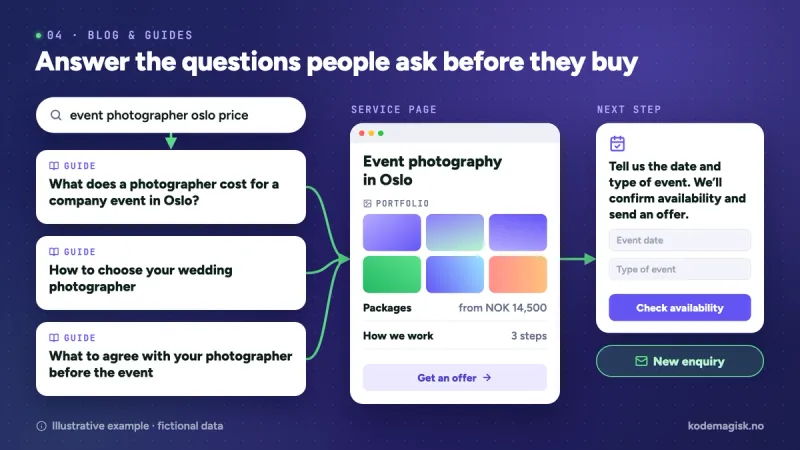
Your service page can present your event photography offering in Oslo: portfolio, working process, packages and contact details. Around it, you can build guides such as:
- “What does a photographer cost for a company event in Oslo?”
- “How to choose your wedding photographer”
- “What to agree with your photographer before the event”
Choose topics based on the services you offer and the questions customers ask you. Search Console data and keyword research can then help you prioritise.
A pricing guide can explain the length of the shoot, editing, travel and usage rights. A guide to choosing a photographer can show readers how to assess a portfolio and what to ask before booking.
If you run an events platform, adapt the topics to what you offer: planning an event, choosing a venue, scheduling or working with suppliers. A search such as “fotograf Bergen” needs content relevant to that service and that city.
Give the reader a natural next step
Once you have answered the question, suggest an action that fits the topic. For the photographer’s guide, the message could be: “Tell us the date and type of event, and we will confirm availability and prepare a quote.”
You can also link to your portfolio or service page. This makes it easy for interested readers to find the information they need to continue.
Your blog and service pages work together: the guide explains, the portfolio provides examples and the commercial page makes the offer clear.
How the four elements work together
Take a hypothetical example: you publish a guide to planning a company event in Oslo.
In Search Console, you check whether the page is indexed and which searches it appears for. In Analytics, you see how visitors reach the portfolio and whether they send enquiries. When packages or working practices change, you update the information. The questions you receive help you choose the next guide.
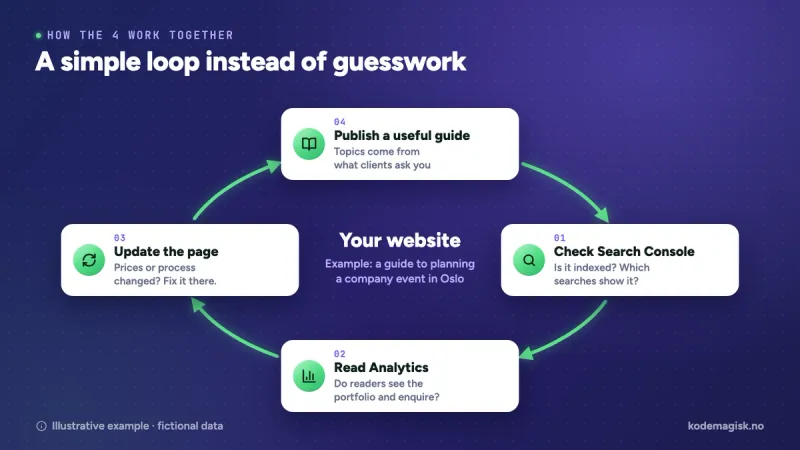
This creates a process for improvement based on what is happening in your business. Every article and every change has a purpose you can explain.
What you can check this week
- Do you have access to Search Console, and have you checked your main service pages?
- Do you know which searches bring people to your website?
- Do you measure actual enquiries as well as visits?
- Are your prices, services and contact details up to date?
- Is there a question customers often ask that you could answer in a useful guide?
These four areas provide a starting point. Results also depend on competition, the relevance of your offering, the technical functioning of your website and how easily a visitor can become a customer.
A website that supports your business
At Kodemagisk, we see your website as a working tool for your business. Design, page structure, content management and measurement should be considered together.
We develop websites and applications and can help you build a clear foundation for your online presence: well-presented services, content that is easy to update and a simple path to contacting you or making a booking.
Does your website look good, but you are unsure why it receives so few enquiries? Send us its address and tell us what you want to achieve. We can discuss what needs improving and which priorities matter most for your business.